Uncategorised
EMRS Fall meeting 2026


Why Lasers, Not Paint, Might Cool the Next Generation of Spacecraft
Laser surface engineering offers a fundamentally different manufacturing route to spectral control than the paints, multilayer dielectric stacks, and lithographically patterned metasurfaces currently used for spacecraft thermal-control surfaces. Because the optical function is written directly into the bulk substrate and its native oxide rather than applied as a bonded layer, laser-textured surfaces eliminate the coefficient-of-thermal-expansion mismatch, adhesive embrittlement, and delamination risk that drive degradation of paint and second-surface-mirror coatings over repeated deep thermal cycling in orbit; they carry no organic binder to photo-degrade or outgas under UV and atomic-oxygen exposure, removing a known source of both optical drift and contamination of nearby sensitive optics; and they add no coating mass or separate application step, since the thermal-control function is generated in the same manufacturing operation as the structural surface itself. Laser processing is also inherently scalable to the complex, curved, large-area geometries relevant to next-generation platforms — including the far larger radiator areas implied by proposed orbital high-power-density applications such as space-based AI data centres — in a way that cleanroom lithography and multilayer deposition, both fundamentally planar processes, are not. Critically, because the optical response is set entirely by laser-processing parameters (fluence, pulse duration, scan pattern) rather than by material formulation or fixed layer stacks, the same tool and process can in principle be reprogrammed to deliver spatially varying spectral function across a single component — a capability with no straightforward analogue in paint- or deposition-based approaches. These are manufacturing and durability advantages, however, not evidence that laser processing can achieve the spectral selectivity itself: existing approaches can already deliver low solar absorptance or high thermal emissivity independently, and the open scientific question — which this Fellowship addresses directly — is whether both can be achieved simultaneously through laser-programmed multiscale morphology and chemistry, without one degrading the other as it does in current laser-blackening approaches.
requistion form
socks5 local
ssh -D 1080 -C -N username@ip
creat a local socks5 proxy at port 1080
metachat modules

Top 10 Claude Code Skills Every Builder Should Know in 2026
If you’ve built agent workflows with pure prompting, you’ve likely run into hard limits. The model can generate logic, but it cannot securely execute code, call authenticated APIs, persist state, or orchestrate multi-step tool chains on its own.
Claude Code Skills provides that missing execution layer. They let Claude interface with external systems, manage authentication, query databases, automate browser operations, and maintain structured context across sessions. You move from simulated workflows to real system interactions.
For developers and teams building production-grade AI agents, skills define what the system can actually do.
Here are the top 10 Claude Code skills that matter.
TL;DR
- Claude Code Skills extends Claude with modular execution capabilities such as tool access, sandboxed code, memory, and structured workflows.
- Composio — serves as the integration backbone with 850+ SaaS apps, OAuth lifecycle management, scoped credentials, and standardized action schemas.
- Remotion Best Practices — gives Claude deep knowledge of animations, timing, audio, captions, and 3D so it writes correct Remotion code every time
- Frontend Design — forces a bold design direction upfront — brutalist, maximalist, retro-futuristic, whatever — then executes with precision instead of defaulting to generic AI slop
- agent-browser — lets Claude control any web interface through stable element refs, no clean API required, with full support for clicks, fills, screenshots, and parallel sessions
- Supermemory — tracks facts about users over time, handles contradictions, auto-forgets expired info, and delivers personalized context in under 50ms
- File/Document Processing — gives Claude direct access to PDFs, spreadsheets, and CSVs for parsing, cleaning, validating, and converting into pipeline-ready formats
- Marketing Skills — packages marketing strategy, campaign planning, and content creation into repeatable workflows instead of one-off prompt chains
- agent-sandbox-skill — spins up isolated cloud sandboxes where Claude can build, host, and test full-stack apps without ever touching your local files or production environment
- Superpowers — walks the agent through brainstorm → spec → plan → subagent execution → review → merge, keeping multi-step dev work structured and on track
- Web Design Guidelines — pulls the latest design rules from the source repo and checks your interface code against every one of them before you ship
What Are Claude Code Skills?
Claude Code Skills package execution logic into structured, reusable modules that extend an agent’s capabilities. They move workflow logic out of oversized prompts and into versioned units you can inspect, update, and reuse.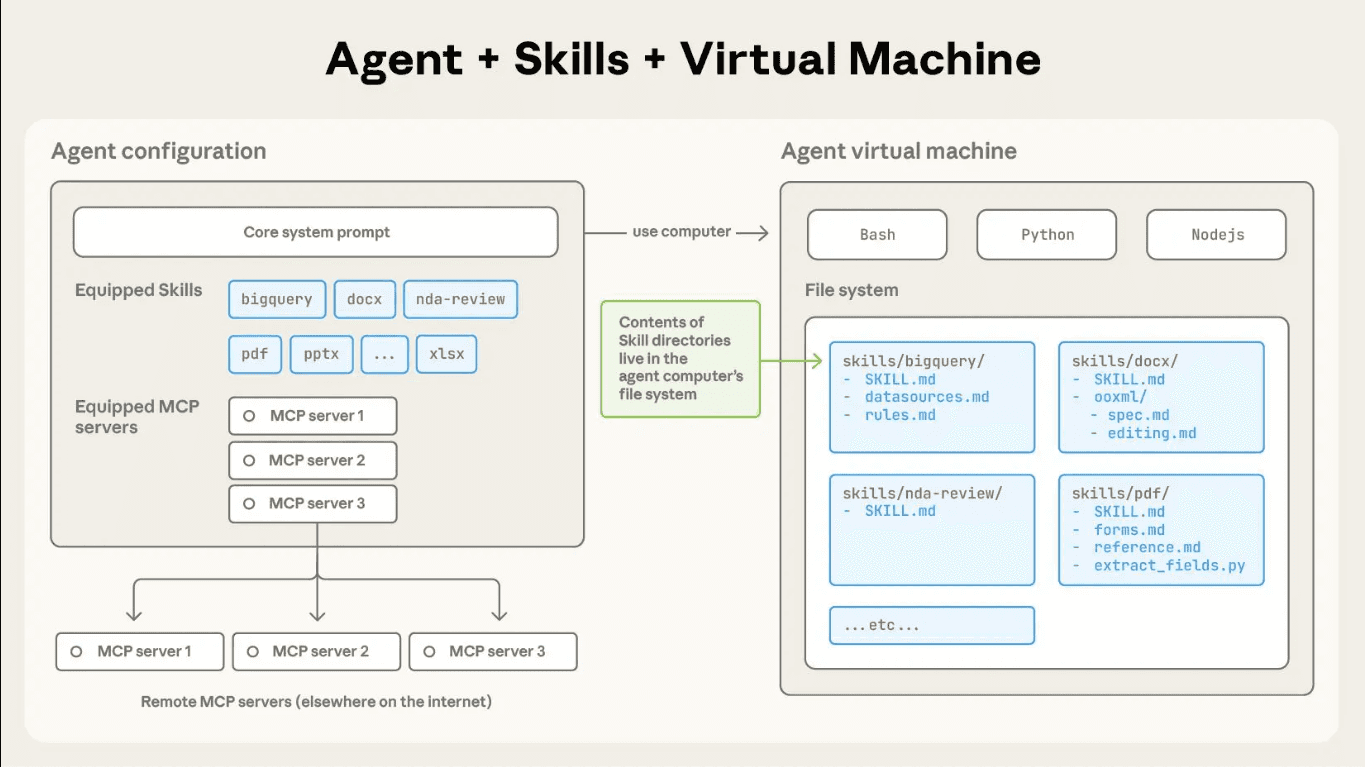
A skill defines how Claude should perform a specific class of tasks. Inside a skill, you can include:
- Metadata for discovery
- Explicit operational steps
- Domain constraints
- Supporting reference files
- Executable scripts
This structure lets you codify repeatable workflows once and apply them consistently. You reduce prompt sprawl, cut token overhead, and gain tighter control over the agent’s behaviour.
When you build with skills, you stop embedding fragile logic in long prompts. You encapsulate behaviour into clear modules and let Claude load them when needed.
Skill Architecture and Execution Model
Each skill lives in its own directory and starts with a SKILL.md file. That file defines the skill’s name, purpose, and step-by-step execution logic. Claude reads the metadata first to determine relevance. When the task matches, Claude loads the full instructions and any supporting files.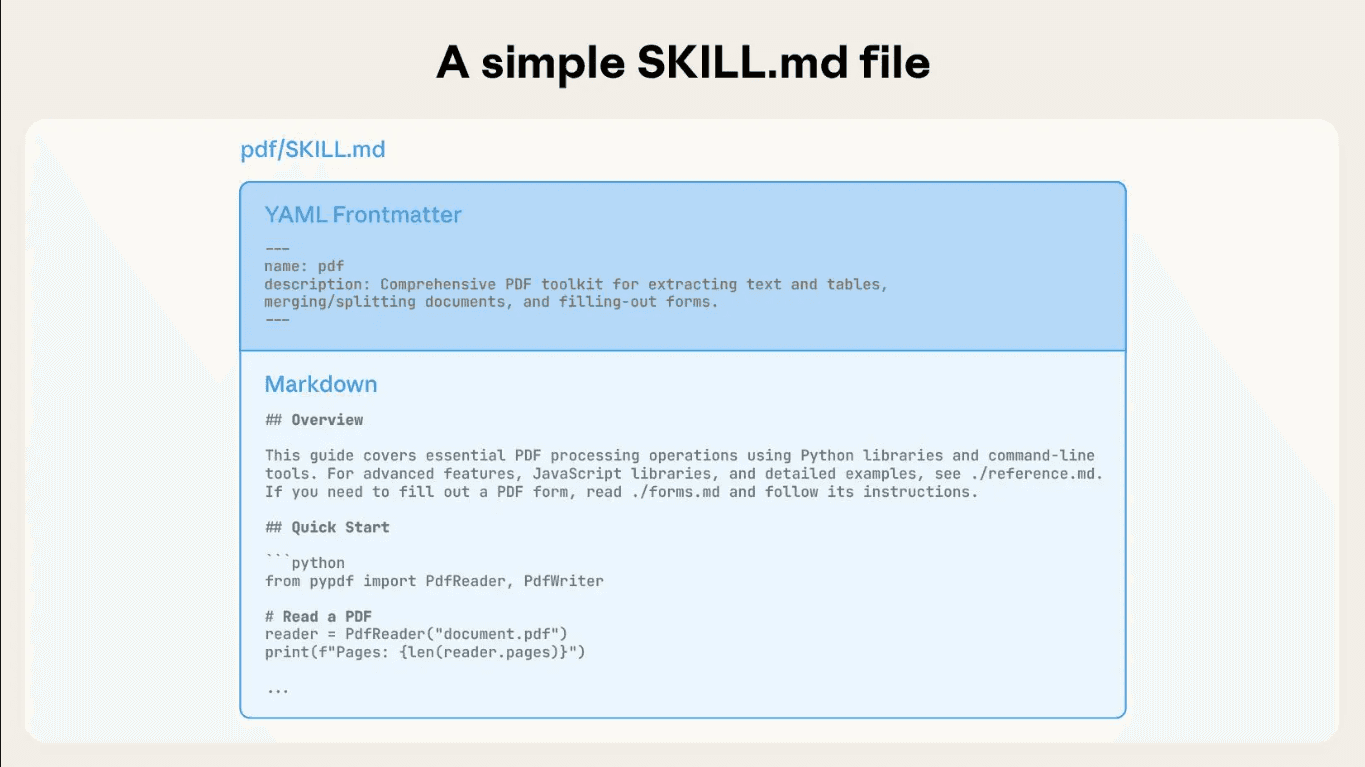
You can attach scripts to a skill and run them in a sandbox. Claude can execute deterministic logic, call APIs, process files, and manage multi-step workflows reliably.
Claude combines skills on a task basis, so you can build complex workflows without bloated prompts. This modular setup keeps execution structured and easier to scale.
Top 10 Claude Code Skills for Production Grade Agents
These skills consistently appear in real-world builds. They cover infrastructure, execution, data access, and orchestration. These layers move agents from demo to deployment.
Let us now look at the 10 Claude Code skills teams rely on to build and ship production-grade agents.
1. Composio Skills
Composio functions as an agent-native integration and execution layer. It standardizes external APIs into structured, callable tools that Claude can discover and invoke through a consistent schema.
You register integrations once and expose them as normalized tool interfaces. The agent selects tools dynamically based on task context and passes structured arguments that map directly to validated API operations.
Add Composio skills to your AI assistant:
This command installs the Composio agent skills, giving your AI assistant access to:
- Tool Router best practices – Session management, authentication, and framework integration
- Triggers & Events – Real-time webhooks and event handling
- Production patterns – Security, error handling, and deployment guides
Your AI assistant can now reference these skills when helping you build with Composio!
Technical capabilities include:
- 1000+ prebuilt toolkits mapped to typed action schemas
- OAuth 2.0 and API key lifecycle management with automatic token refresh
- Scoped credential isolation per agent, environment, or workflow
- Tool discovery via metadata indexing and semantic matching
- Deterministic request construction with validated input parameters
- Structured JSON responses for downstream chaining
- Sandboxed execution environment for safe tool invocation
- Execution logs, traceability, and observability for debugging
Composio abstracts API heterogeneity into a uniform execution layer. Claude emits structured tool calls, and Composio validates, authenticates, executes, and returns machine-readable outputs.
Repo: https://github.com/ComposioHQ/skills | Docs: https://docs.composio.dev
2. Remotion Best Practices Skill
The Remotion Best Practices Skill gives Claude deep domain knowledge for building programmatic videos with React. It loads specialized rules for animations, timing, audio, captions, 3D, and more — ensuring Claude generates correct, idiomatic Remotion code every time.
Install it with:
This skill covers:
- Animations & timing — interpolation curves, spring animations, easing, sequencing, and transitions
- Audio & captions — importing audio, trimming, volume control, subtitles via Mediabunny
- Media handling — videos, images, GIFs, Lottie, fonts, and transparent video rendering
- 3D content — Three.js and React Three Fiber integration inside Remotion compositions
- Charts & data viz — bar, pie, line, and stock chart patterns
- Advanced patterns — dynamic metadata, parametrizable videos with Zod schemas, Mapbox maps, ElevenLabs voiceover
With 117K+ weekly installs and security audits from Agent Trust Hub and Socket, it is one of the most widely used official skills in the ecosystem. It activates automatically whenever Claude is working with Remotion code, loading only the relevant rule files on demand to stay context-efficient.
Skill repo: github.com/remotion-dev/skills | Full reference: skills.sh/remotion-dev/skills/remotion-best-practices
3. Frontend Design Skill
The Frontend Design Skill guides Claude to create distinctive, production-grade interfaces that avoid generic “AI slop” aesthetics. Before writing a single line of code, it pushes Claude to commit to a bold conceptual direction — brutally minimal, maximalist chaos, retro-futuristic, art deco, editorial, and more — then execute it with full precision.
Install it with:
This skill enforces:
- Typography — distinctive display/body font pairings; never generic choices like Inter, Roboto, or Arial
- Color & theme — cohesive CSS variable systems with dominant colors and sharp accents over timid palettes
- Motion — high-impact animations, staggered reveals, scroll-triggered effects, and meaningful hover states
- Spatial composition — asymmetry, overlap, diagonal flow, grid-breaking elements, and intentional negative space
- Backgrounds & depth — gradient meshes, noise textures, geometric patterns, layered transparencies, and grain overlays
The skill works across HTML/CSS/JS, React, and Vue, and scales implementation complexity to match the aesthetic vision — maximalist designs get elaborate animations, minimalist designs get precision spacing and restraint. With 110K+ weekly installs across Claude Code, Codex, Gemini CLI, and GitHub Copilot, it is one of the most widely adopted design skills in the ecosystem.
Skill repo: github.com/anthropics/skills | Full reference: skills.sh/anthropics/skills/frontend-design
4. Browser Automation Skill (agent-browser)
agent-browser is a headless browser automation CLI from Vercel Labs, purpose-built for AI agents. It pairs a fast Rust binary with a Node.js/Playwright daemon, giving Claude deterministic, ref-based control over any web interface without needing clean APIs.
Install it with:
The optimal AI workflow is snapshot-first:
Key capabilities:
- Ref-based selection — snapshot returns stable @e1, @e2 refs for deterministic, AI-friendly element targeting
- Full interaction suite — click, fill, drag, upload, hover, scroll, dialogs, frames, tabs, and keyboard/mouse control
- Network control — intercept, mock, and block requests; set headers scoped to origin for auth without login flows
- Isolated sessions & profiles — run multiple parallel browser instances with persistent cookie/auth state
- Live streaming — WebSocket viewport stream for pair browsing alongside an agent
- Cloud providers — swap local Chromium for Browserbase, Browser Use, or Kernel with a single flag
- iOS Simulator — control real Mobile Safari via Appium for authentic mobile web testing
With 14K GitHub stars and skills support for Claude Code, Cursor, Codex, Gemini CLI, and Copilot, agent-browser is the production-grade choice for agentic web automation.
Repo: github.com/vercel-labs/agent-browser | Docs: agent-browser.dev
5. Memory and Context Management Skill (Supermemory)
Supermemory is the #1-ranked memory and context engine for AI — topping LongMemEval, LoCoMo, and ConvoMem, the three major AI memory benchmarks. Unlike RAG (which retrieves static document chunks), Supermemory extracts and tracks facts about users over time, understands temporal changes, resolves contradictions, and automatically forgets expired information.
Install the Claude Code plugin:
Once installed, your agent gets three tools that fire automatically:
- memory — saves or forgets information; called automatically when you share something worth remembering
- recall — searches memories by query and returns relevant results alongside your user profile summary
- context — injects your full profile (preferences, recent activity) into the conversation at the start of each session; in Claude Code, just type /context
The full context stack in one API:
- Memory Engine — extracts facts from conversations, tracks updates, resolves contradictions, auto-forgets expired info
- User Profiles — auto-maintained per-user context (static facts + recent dynamic activity) delivered in ~50ms
- Hybrid Search — RAG + Memory in a single query; returns knowledge base docs and personalized context together
- Connectors — real-time sync from Google Drive, Gmail, Notion, OneDrive, GitHub via webhooks
- Multi-modal Extractors — PDFs, images (OCR), videos (transcription), code (AST-aware chunking)
Integrates as a drop-in wrapper with Vercel AI SDK, LangChain, LangGraph, OpenAI Agents SDK, Mastra, and Agno. With 16.7K GitHub stars and benchmarks proving state-of-the-art recall, it’s the most production-proven memory layer in the ecosystem.
Repo: github.com/supermemoryai/supermemory | Docs: supermemory.ai/docs
- File System and Document Processing Skill
The File System and Document Processing Skill gives Claude controlled access to file environments, enabling direct work with PDFs, spreadsheets, CSVs, and structured reports in enterprise workflows.
Install it with:
Key capabilities:
- PDF extraction — parse tables, text blocks, and metadata from complex documents
- Spreadsheet normalization — clean, validate, and transform Excel/CSV data into structured formats
- Field validation — enforce schemas, detect anomalies, and flag inconsistencies in structured data
- Format conversion — transform raw files into JSON, XML, or database-ready outputs
- Batch processing — handle multiple documents in parallel with consistent transformation rules
The skill operates on actual file contents, producing verifiable outputs that integrate seamlessly with databases, analytics pipelines, and workflow engines. Document-heavy operations become programmable components inside broader automation systems rather than isolated manual tasks.
Repo: github.com/ComposioHQ/awesome-claude-skills
7. Marketing Skills (marketingskills)
The Marketing Skills package provides Claude with specialized knowledge for marketing strategy, campaign execution, and content creation. It helps the agent generate marketing materials, analyze campaigns, and implement best practices across various marketing channels.
Install it with:
This skill enables Claude to assist with marketing workflows, content strategy, campaign planning, and performance analysis — turning marketing tasks into structured, repeatable operations that integrate with broader automation systems.
Repo: github.com/coreyhaines31/marketingskills
8. Code Execution Sandbox Skill (agent-sandbox-skill)
agent-sandbox-skill gives Claude (and other coding agents) a fully isolated E2B cloud sandbox to plan, build, host, and test full-stack applications — all without touching your local filesystem or production environment. Each agent fork gets its own independent sandbox, making it safe to run untrusted code, install packages, or spin up servers at any scale.
The core workflow is a single command:
This orchestrates a full Plan → Build → Host → Test lifecycle. Individual commands are also available for finer control:
- \sandbox <prompt> — ad-hoc sandbox operations with minimal compute
- \agent-sandboxes:plan-full-stack <prompt> — generates a detailed implementation plan with browser UI testing workflows
- \agent-sandboxes:build <plan_path> — executes a build plan inside the sandbox
- \agent-sandboxes:host <sandbox_id> <port> — exposes a port and returns a public URL
- \agent-sandboxes:test — runs validation tests including browser UI testing via built-in Playwright integration
Key capabilities:
- Isolation — every agent fork runs in a gated E2B sandbox, fully separated from local files and production systems
- Scale — run as many parallel sandboxes as needed; each is independent with its own compute
- Full-stack development — scaffold, build, and host Vue + FastAPI + SQLite apps end-to-end
- Persistent context — tools to manage sandbox lifecycles across agent turns
- Prompt library — 40+ tiered prompts (very easy → very hard) for real full-stack app workflows, tested with Claude Sonnet, Opus 4.5, Gemini, and Codex
Setup requires Python 3.12+, uv, and an E2B API key. Works with Claude Code, Gemini CLI, and Codex CLI out of the box.
Repo: github.com/disler/agent-sandbox-skill | E2B docs: e2b.dev/docs
9. Multi-Agent Orchestration Skill (Superpowers)
Superpowers is a complete agentic software development workflow built on a composable skills framework. Rather than jumping straight into code, it guides the agent through a structured process: brainstorm → design spec → implementation plan → subagent-driven execution → review → merge.
Install in Claude Code via the plugin marketplace:
The core workflow steps:
- brainstorming — refines rough ideas through Socratic questions, presents the design in digestible chunks for sign-off, saves a design document
- using-git-worktrees — creates an isolated branch and workspace after design approval, verifies a clean test baseline before any code is written
- writing-plans — breaks approved designs into 2–5 minute tasks with exact file paths, complete code, and verification steps
- subagent-driven-development — dispatches a fresh subagent per task with two-stage review (spec compliance, then code quality); Claude can often run autonomously for hours without deviating
- test-driven-development — enforces strict RED-GREEN-REFACTOR; deletes any code written before a failing test exists
- requesting-code-review + finishing-a-development-branch — reviews against plan by severity, then presents merge/PR/keep/discard options and cleans up the worktree
Skills trigger automatically — the agent checks for relevant skills before any task, making the entire workflow mandatory rather than optional. With 40.9K GitHub stars and 3.1K forks, Superpowers is the most battle-tested multi-agent development methodology in the ecosystem.
Repo: github.com/obra/superpowers | Marketplace: github.com/obra/superpowers-marketplace
10. Web Design Guidelines Skill
The Web Design Guidelines Skill gives Claude the ability to review web interface code for compliance with established design standards. It fetches the latest guidelines from a canonical source and validates files against all defined rules, outputting findings in a structured format.
Install it with:
Key capabilities:
- Automatic guideline sync — fetches the latest rules from the source repository before each review
- File pattern matching — reviews specified files or prompts for file patterns to analyze
- Comprehensive rule checking — validates against all rules defined in the fetched guidelines
- Structured output — reports findings in terse
file:lineformat for easy integration with development workflows - Fresh validation — always uses the most current version of the guidelines, ensuring consistency with evolving standards
The skill operates by fetching guidelines from github.com/vercel-labs/web-interface-guidelines, reading the target files, applying all rules, and outputting violations. With 22K GitHub stars and 133.4K weekly installs across Claude Code, Cursor, Codex, Gemini CLI, and Copilot, it’s a widely adopted standard for web interface validation.
Repo: github.com/vercel-labs/agent-skills
Skills Best Practices
Writing Effective Skills
A well-written skill is a specific, focused instruction set — not a general-purpose prompt. Treat each skill like a module: it should do one thing well and compose cleanly with others.
- Start with a clear trigger condition. The skill should specify exactly when it activates — e.g. “before writing any code” or “when the user asks to deploy.” Vague triggers cause skills to fire too broadly or not at all.
- Use imperative language. Write instructions as direct commands: “Always run tests before committing”, not “You might want to consider running tests.” Agents follow directives more reliably than suggestions.
- Keep skills short and scannable. Long skills dilute attention. If a skill exceeds ~50 lines, split it into two focused skills with clear separation of concerns.
- Include examples of correct and incorrect behavior. Concrete examples reduce ambiguity and dramatically improve consistency, especially for edge cases.
- Version your skills. Treat SKILL.md like code — commit changes, document why you changed behavior, and roll back when a change degrades agent performance.
Combining Multiple Skills
The real power of skills comes from composition. Individual skills handle one concern; stacked together, they form a complete agentic workflow.
- Design for independence first. Each skill should be useful on its own before you compose it. Skills with tight dependencies on other skills create fragile systems that break when one piece changes.
- Establish a clear execution order. If skills have sequencing requirements (e.g. brainstorm before plan, plan before execute), make the order explicit in a top-level orchestration skill rather than burying it in each individual skill.
- Avoid conflicting instructions. When combining skills from different sources, audit for contradictions — e.g. one skill saying “always ask before running commands” and another saying “execute autonomously.” The agent will resolve conflicts inconsistently.
- Use a meta-skill to load context. A lightweight “project setup” skill that runs at session start can inject the right combination of skills for the current task, reducing the need to manually specify which skills apply.
Performance & Token Efficiency
Every skill adds tokens to your context window. At scale, bloated skill sets slow responses, increase costs, and dilute the model’s attention on the actual task.
- Load skills on demand, not by default. Don’t add every skill to every session. Use conditional loading — only inject skills relevant to the current task type (coding, research, writing, etc.).
- Prefer structured formats over prose. Bullet points and numbered lists consume fewer tokens than paragraphs and are easier for the model to parse. Reformatting a 300-word skill as a 20-line checklist often produces equal or better results.
- Deduplicate shared instructions. If three skills all say “never modify production without approval”, consolidate that into a single shared constraint skill. Repetition wastes tokens without improving reliability.
- Benchmark skill impact. Measure response latency and output quality with and without each skill active. If a skill adds significant tokens but doesn’t meaningfully change behaviour, trim it or remove it entirely.
Security & Permissions
Skills that grant agents access to filesystems, APIs, browsers, or external services require careful scoping. The most capable agents are also the most dangerous if permissions are too broad.
- Follow least-privilege by default. Skills should request only the permissions actually needed. A web search skill doesn’t need filesystem access. A database skill doesn’t need shell execution. Scope each skill to its minimum viable permission set.
- Require confirmation for destructive actions. Any skill that can delete, overwrite, deploy, or send data externally should include an explicit human-in-the-loop checkpoint before proceeding. Never make irreversible actions fire automatically.
- Audit third-party skills before use. Skills from external repos can contain arbitrary instructions. Read SKILL.md files carefully before adding them to production agents — treat them like code dependencies, not just configuration.
- Isolate credentials from skill content. API keys, tokens, and secrets should never appear in SKILL.md files. Use environment variables or a secrets manager and reference them by name in skill instructions.
- Log and monitor skill-triggered actions. In production agents, every action taken under a skill’s instruction should be logged with the triggering skill, the action taken, and the result. Observability is the foundation of safe autonomous operation.
Conclusion
Claude Code Skills determines whether your agent can actually execute inside real systems. Reasoning matters, but secure access, controlled execution, and structured integrations define production readiness.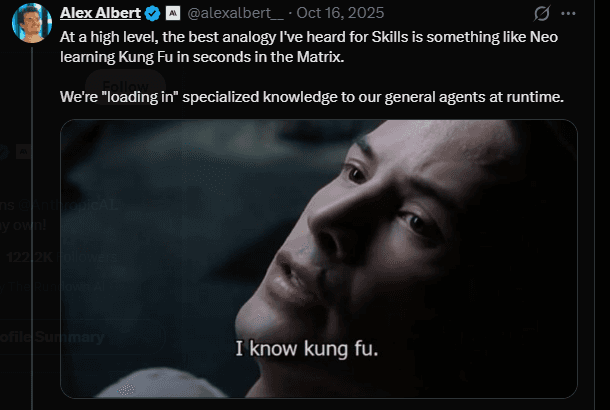
Strong architectures focus on modular capabilities, clear permission boundaries, and observable workflows. When execution stays structured and traceable, automation scales without becoming fragile.
Most production-grade agent stacks depend on a unified integration backbone that connects model decisions to authenticated system actions. Platforms like Composio provide that core layer and enable agents to operate reliably across tools and environments.
Top 10 Claude Code Skills Every Builder Should Know in 2026ContentsMar 4, 2026
- TL;DR
- What Are Claude Code Skills?
- Top 10 Claude Code Skills for Production Grade Agents
- Skills Best Practices
- Conclusion
AuthorAkash
ShareCopy linkPost
Your agents decide. We make it happen.
Laser Ablation for Processing Supercapacitor Materials and Components
Safetyvoice UK
Effective safety culture depends not only on good policies, but on how consistently and transparently they are applied across institutions. As part of our ongoing work on research culture and EDI, we’ve launched SafetyVoice UK — an independent, sector-wide platform for laboratory users, researchers, and technical staff across UK Higher Education to share anonymised experiences of how safety policies are applied in practice. Safety is fundamental. But clear communication, appropriate documentation, and opportunities for dialogue are what make policies work well for everyone. When these elements are inconsistent, it can affect confidence, wellbeing, and the ability to work effectively. SafetyVoice UK is open to contributors from any UK HEI or research organisation. Using AI-assisted anonymisation, the platform identifies common themes across the sector while protecting individual contributors — supporting a more transparent, EDI-aligned approach to safety governance. We welcome colleagues across the sector to share their experiences or perspectives. 🔗 https://safetyvoice.org.uk/ #HigherEducation #LabSafety #EDI #SafetyCulture #ResearchCulture
@UUK (Universities UK), @USHA_HE (Universities Safety & Health Association), or @AdvanceHE